




EA FC 27 includes several commentary languages, allowing you to customize the match experience to your liking. Some languages are installed automatically based on your game region, while others need to be downloaded manually. Here is everything you need to know on how to change commentary language in EA FC 27.
How to Change Commentary Language in EA FC 27
Follow these steps to change your commentary language:
- Launch EA FC 27.
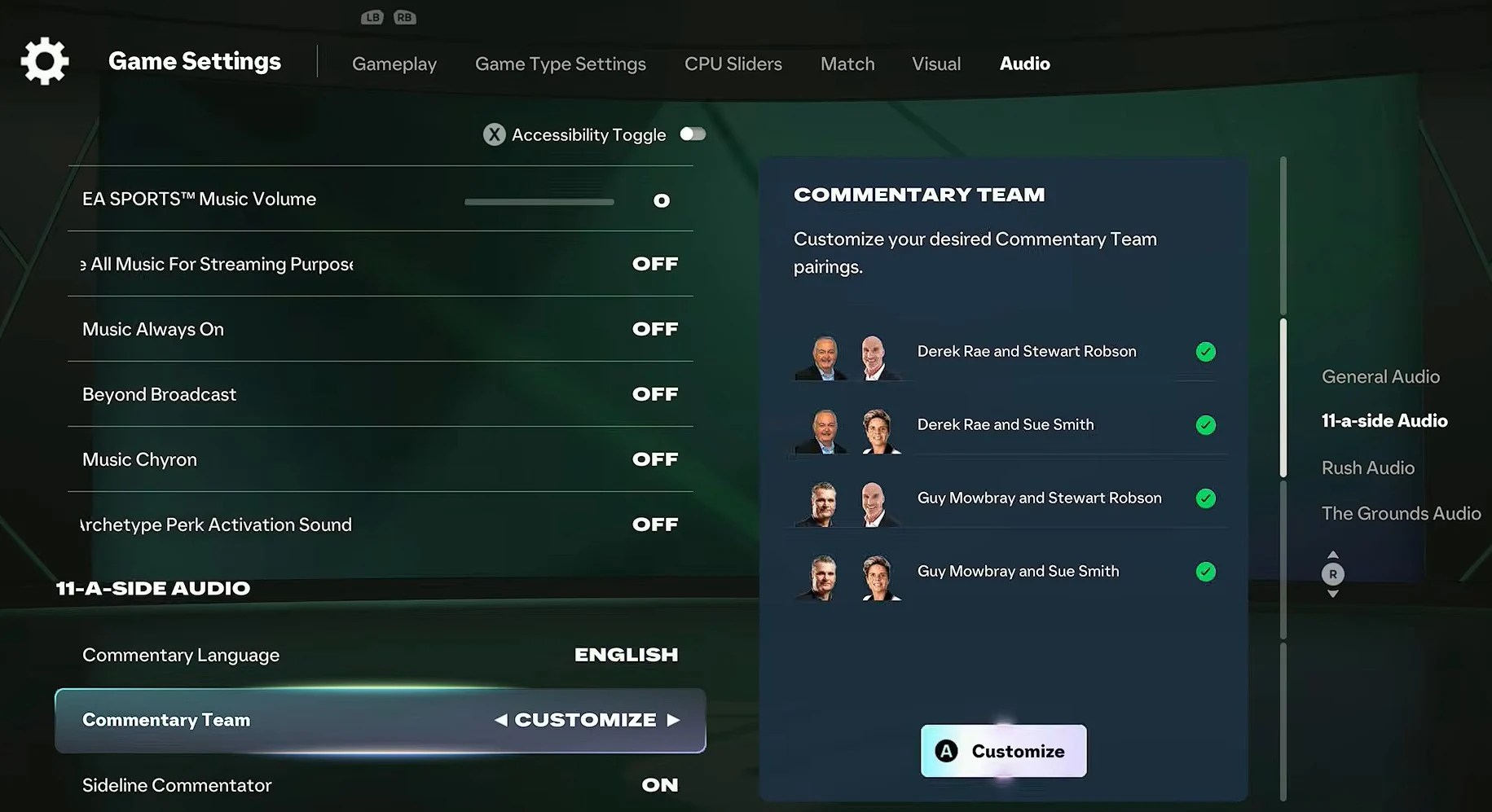
- Open the Settings menu from the main screen.
- Select Game Settings from the list.
- Switch to the Audio tab all the way on the right.
- Scroll down until you find the Commentary Language option.
- Select your preferred Commentary Language.
- Note: English language features a list of Commentary Teams to choose from.
The change applies immediately, although some languages require an additional download before they become available.
How to Download Commentary Languages
If your preferred language isn’t listed in-game, you may need to force the game to download it first. Here is how to do that:
- Open the game in your Steam/EA/etc. library.
- Open the game settings.
- Select your preferred language from the language drop-down menu.
- Close the settings window to apply the changes.
- Relaunch EA FC 27 and wait for the language pack to download.
Can You Change Commentary During a Career Mode Save?
Yes, commentary settings are tied to your game settings rather than an individual save, meaning you can change commentary languages at any time, including while playing Career Mode, Ultimate Team, or Clubs.
EA FC 27 Commentary Language FAQ
A: Yes, the option is available in the Audio settings menu.
Q: Do you need to download commentary packs?
A: Some languages require an additional download before they can be used.
Q: Does commentary language affect subtitles?
A: No, the commentary and subtitle languages are separate settings.
Changing commentary is one of the quickest ways to customize your EA FC 27 experience. If your favorite language isn’t installed by default, simply download the additional pack and switch to it through the Audio settings. Also, to find more helpful content, including the list of EA FC 27 system requirements, be sure to visit the Guides section here on Gamepur!









Published: Sep 29, 2026 10:23 pm