



World of Warcraft: Forever supports gamepads, but you have to switch the input type in the options before the controller layout kicks in. So, here is how to use a controller in WoW Forever, plus the key button controls, the action bar sets, and what is still in beta.
Does WoW Forever Support Controllers?
Yes, World of Warcraft: Forever supports all XInput-compatible controllers, and it shows Xbox or PlayStation button icons. Blizzard still calls the gamepad support a beta, so not every screen has controller prompts yet, and you will need a keyboard nearby to type in chat.
How to Switch to Controller Controls in WoW Forever
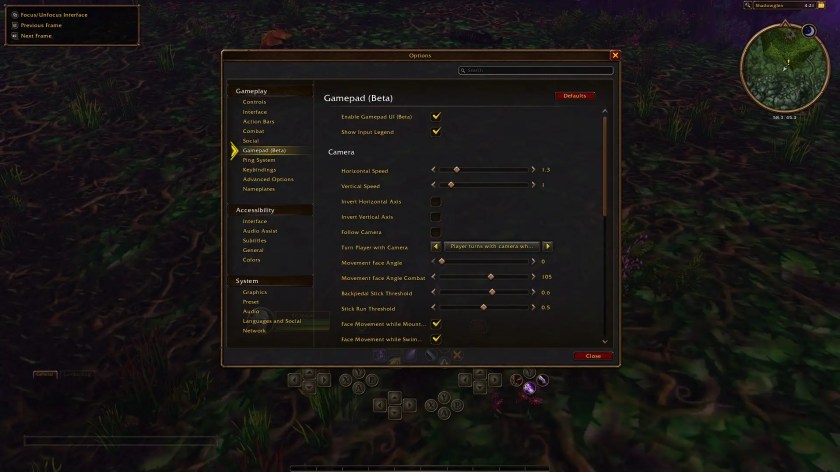
Controller controls in World of Warcraft: Forever stay off until you switch away from keyboard and mouse in the options menu. The same screen holds the gamepad settings, so take a quick look at them before heading into your first quest. Here are the steps:
- Press Esc to open the Game Menu.
- Select Options from the list.
- Under Gameplay, select Gamepad.
- Check the Enable Gamepad UI checkbox.
- Edit the gamepad settings to adjust Camera, HUD Modifier, Frame Focus Style, Action Bars, Targeting, and Raid Targeting Options.
WoW Forever Controller Controls
Here are the main controls, using Xbox button names. The layout is built around action bar sets, so one button can trigger several abilities depending on which triggers you hold. Blizzard’s Mage example puts four different spells on the same D-pad direction:
- Move: Left stick
- Camera: Right stick
- Target a friendly: LB
- Target an enemy: RB
- Switch action bars: Hold LT, RT, or both, then release to return to the default bar
- Switch action bar sets: Hold LB + RB and press Left or Right on the D-pad
- Zoom the camera: Hold LB + RB and move the right stick forward or back
- Main menu: Menu button
- Backpack: Hold LB + RB, then press B
- Quest Tracker: Hold LB + RB, then press Up
- Chat: Hold LB + RB, then press Down
- Manage Buffs: Hold LB + RB, then press Y
WoW Forever Controller FAQ
A: Not yet. You can open the chat with the controller, but typing still needs a keyboard.
Q: How many action bar slots do I get on a controller?
A: Each set has four bars with 28 slots, and you can switch between three sets, which gives you 84 slots in total.
Q: Is controller support finished in WoW Forever?
A: No, it is still in beta. Blizzard says it plans further refinements, including more gamepad prompts on screens that do not have them yet.
Q: Does the controller light change color?
A: Yes, on controllers with supported lighting, the light is red for Horde and blue for Alliance.
That covers how to use a controller in WoW Forever and the buttons you will use most. Since the gamepad layout lives in the options menu, our look at the experience presets and how to change them in WoW Forever is worth a read, too!









Published: Nov 4, 2026 09:30 pm