



World of Warcraft: Forever asks you to pick an experience preset the first time you log in, and that choice changes the visuals and a handful of interface features. Here is how to change the experience preset in WoW Forever if you want to switch later.
What Are the Experience Presets in WoW Forever?
WoW Forever has two experience presets, Classic and Enhanced, and they only change the presentation, not your ruleset. Classic keeps things traditional with simpler visuals, while Enhanced adds higher visual fidelity and extra interface features. Here is what each preset sets by default:
| Setting | Classic | Enhanced |
|---|---|---|
| Character models | Standard Definition | High Definition |
| Quest points of interest and objective blobs | Off | On |
| One-bag | Off | On |
| Transmog | Off | On |
| Keyboard movement | Camera turning | Strafe |
| Screen layout | Classic | Centralized |
How to Change the Experience Preset in WoW Forever
The preset is only a starting point, so you are not locked in after the first login screen. You can switch to the other one or fine-tune individual settings later from the game options, and the steps below take you there. Your model choice is separate, so it stays as you set it. Here is how to do it:
- Press Esc to open the Game Menu.
- Select Options from the list.
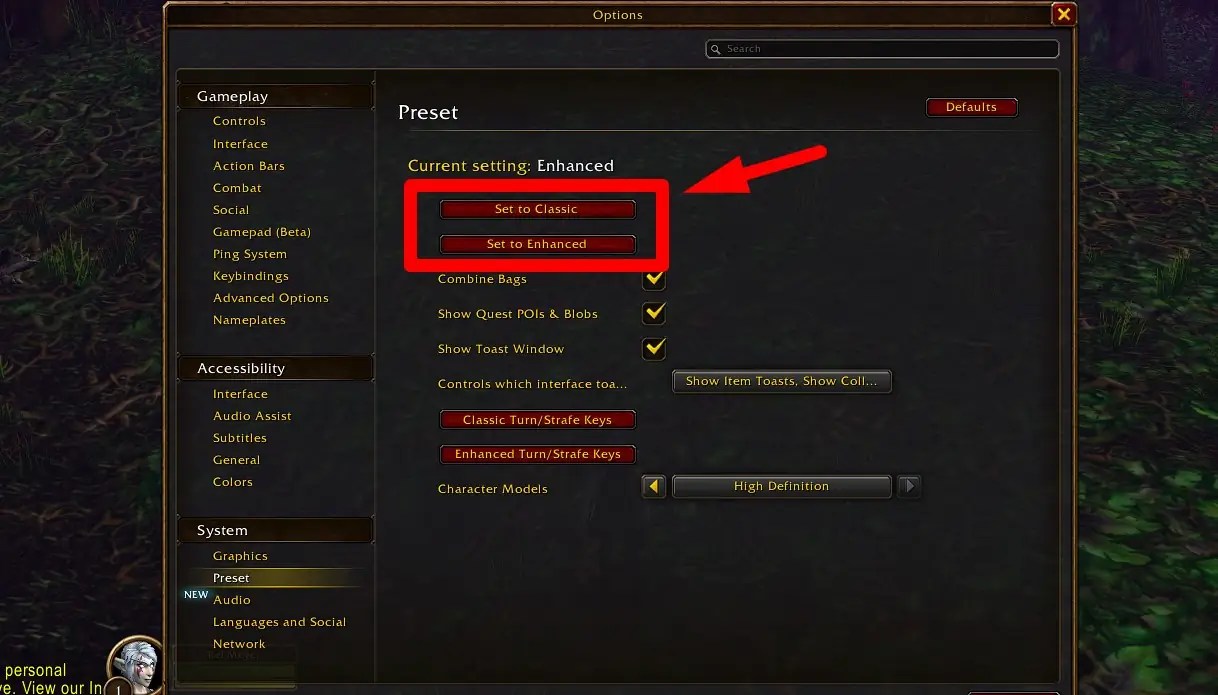
- Open the Preset settings under the System category at the bottom left.
- Choose Set to Classic or Set to Enhanced to switch the presets.
- Adjust any individual settings you want to keep different from the preset.
WoW Forever Experience Preset FAQ
A: If you are not sure, Blizzard recommends starting with Enhanced.
Q: Does the preset change my abilities or progression?
A: No, the presets change the presentation and interface features. The HD or SD model choice affects only how your character looks.
Q: Can I change my character models later?
A: Yes, you can change between High Definition and Standard Definition in the options menu or at a Barbershop in the game.
Q: Is Transmog on with the Classic preset?
A: No, Transmog starts switched off with Classic and on with Enhanced.
That covers everything on how to change the experience preset in WoW Forever and what each option switches on. Since Transmog starts switched off on the Classic preset, our guide on how to transmog in WoW Forever shows where to find it. Also, be sure to bookmark Gamepur for more helpful content!





Published: Nov 4, 2026 09:21 pm