



World of Warcraft: Forever lets you link your Discord account to the game, and guilds can mirror their guild chat to a Discord channel. Here is how to link Discord in WoW Forever, both for your own account and for a guild leader setting up the channel.
What Does Linking Discord Do in WoW Forever?
Linking Discord connects your Discord account to your Battle.net account and lets messages travel between Discord and your guild chat. Blizzard’s Discord integration works in World of Warcraft: Forever as well as modern WoW, and you only need a Battle.net account and a Discord account to set it up.
How to Link Your Discord Account in WoW Forever
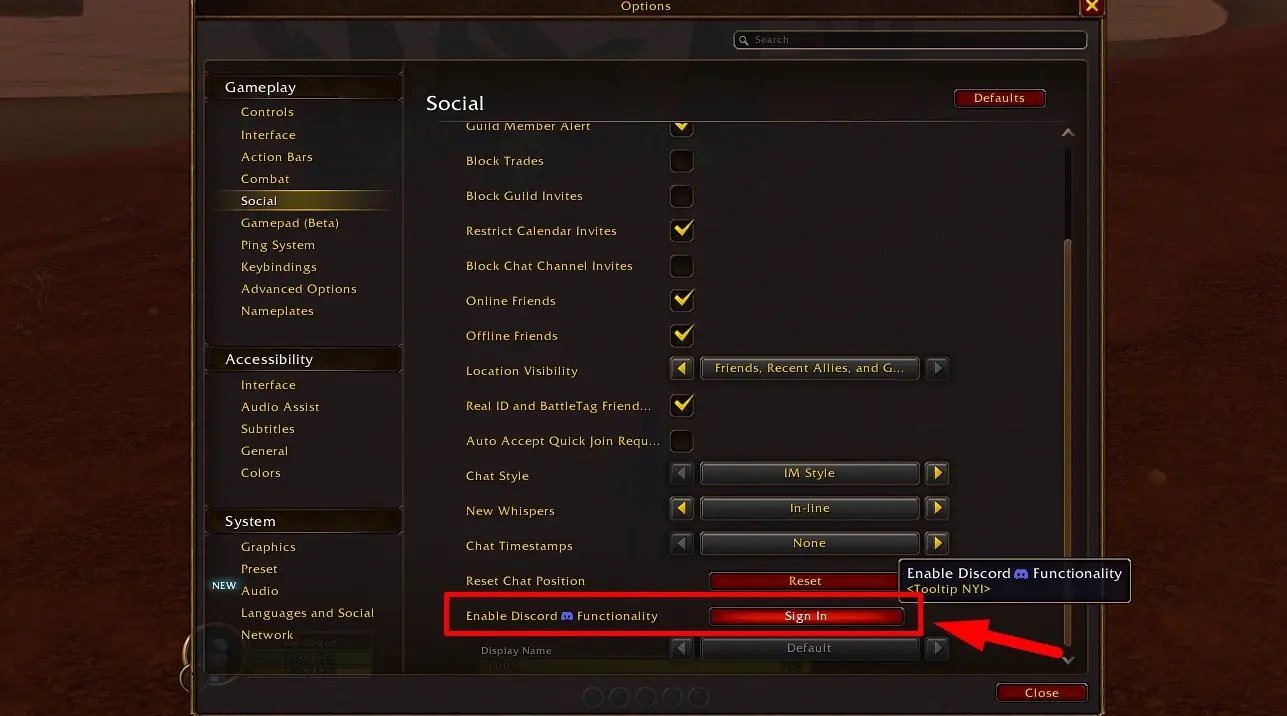
Every player does this part, whether or not your guild uses Discord. Log in to Discord before you start, because Discord asks you to confirm the connection at the end. Once that is done, your account is ready for guild chat linking. Here are the steps:
- Press Esc to open the Game Menu.
- Select Options.
- Open the Social tab.
- Click on Sign In under Enable Discord Functionality.
- Follow the on-screen prompts and confirm the connection in Discord.
How to Link a Guild to a Discord Channel in WoW Forever
Only the guild leader or officers with the right permissions can link a guild. A Discord admin also has to enable Manage Channels, View Channel, and Send Messages for the channel you want to use, or it will not appear as an option in the game. Here are the steps:
- Press J to open Guild & Communities.
- Select the Roster tab on the right side of the panel.
- Select Guild Settings at the bottom right.
- Open the Guild Control dropdown and select Discord Settings.
- Click your Discord server in the list.
- Choose a channel from the dropdown and click the link button.
How Does Discord Chat Work With Guild Chat?
Messages from Discord and from the game look different, so you can tell where they came from. Players who have not linked their account will not have their messages show in the Discord chat. You can also choose how your name appears on Discord messages with the Display Name dropdown:
- Default: Currently your last online character
- Last Online Character Name: The last character you played on your Battle.net account in that guild
- Discord Global Name: Your Discord global name
WoW Forever Discord FAQ
A: No, it is an option you enable in the Social tab of the options menu.
Q: Who can link a guild to a Discord channel?
A: The guild leader or officers with the right permissions.
Q: Can Discord chat have its own channel in the game?
A: Yes, guild leaders can send Discord messages to the regular guild chat or to a dedicated /discord channel, and they can change this at any time.
Q: Why can’t I see a Discord channel when linking?
A: The channel needs the Manage Channels, View Channel, and Send Messages permissions enabled by a Discord admin first.
That covers how to link Discord in WoW Forever for players and guild leaders alike. If you are getting your character ready to meet your guild, our guide on how to hide your second name in WoW Forever helps tidy up your nameplate, so stay tuned to Gamepur for more!



Published: Nov 6, 2026 04:46 am