



Slayers 2 gives you Skill Points to spend on different parts of your character’s skill tree, but you aren’t stuck with your choices forever. If you’ve invested your points into the wrong skills, you can reset them and spend them again. Here is everything you need to know about how to reset your Stats / Skill Points in Slayers 2.
How to Reset Skill Points in Slayers 2
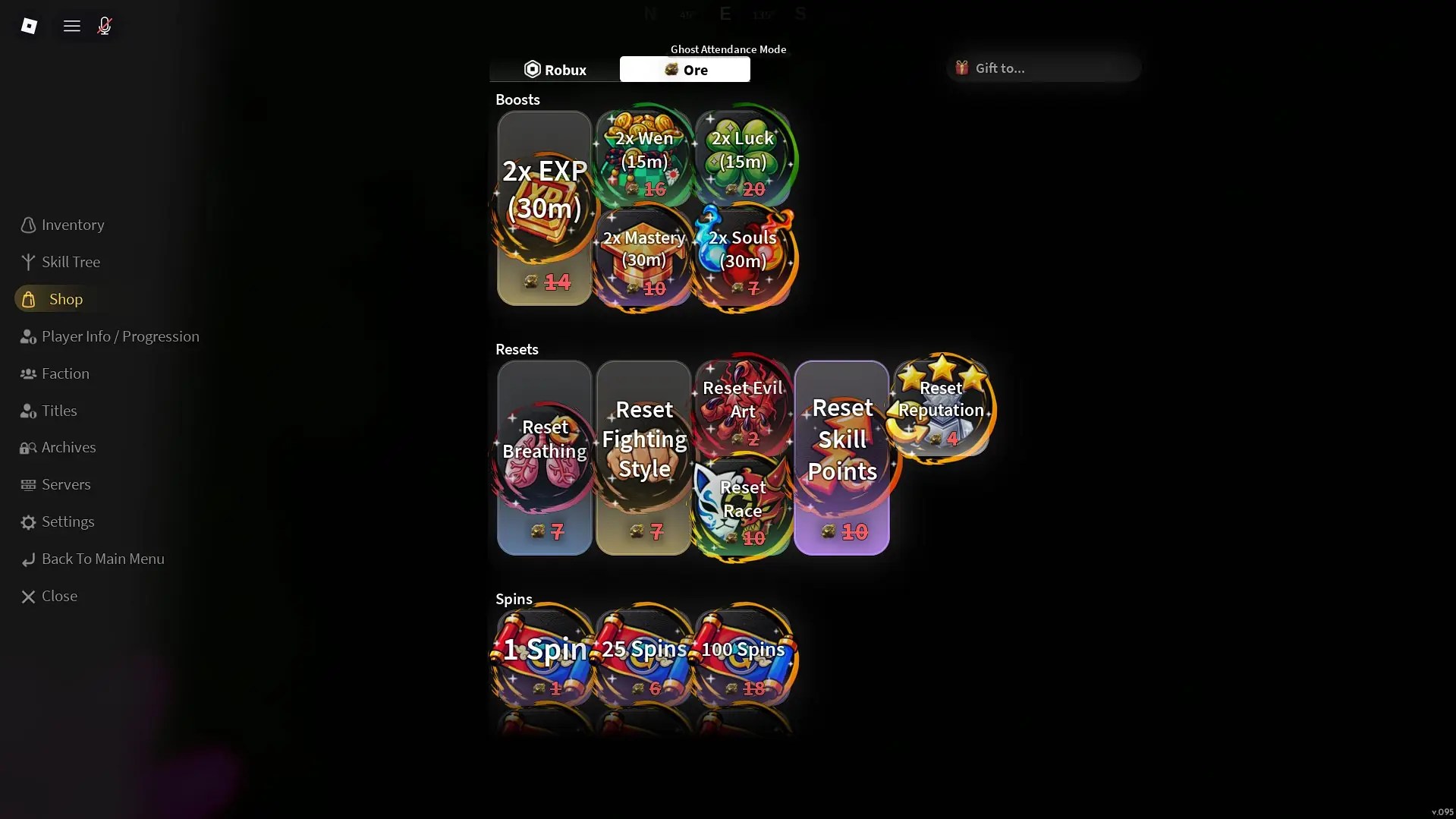
The main way to reset your Skill Points / Stats in Slayers 2 is by purchasing a Reset Skill Points item from the in-game Shop. You can buy the reset using either Ore or Robux, giving you a way to completely refund your spent Skill Points without relying on limited-time codes. To purchase a reset:
- Launch Slayers 2 on Roblox.
- Open the three-line menu in the top-left corner.
- Select Shop.
- Find Reset Skill Points.
- Purchase the reset using Ore or Robux.
- Use the reset to refund your spent Skill Points.
Once the reset is used, your previously spent Skill Points become available again, allowing you to put them into different abilities.
Can You Reset Stats for Free in Slayers 2?
Yes. Slayers 2 can also provide Skill Point Resets through codes. These are generally a limited source of free resets, so you shouldn’t rely on them as your primary way of changing your build. If you’re looking for a reset and don’t have an active code available, the in-game Shop is the reliable option since you can purchase one with Ore or Robux.
What Happens When You Reset Your Stats?
A Skill Point Reset refunds the points you’ve invested into the Skill Tree, allowing you to spend them again on different upgrades. This is useful if you’ve changed your playstyle, unlocked a different progression path, or simply want to experiment with another build.
You don’t lose the Skill Points themselves when using a reset. Also, keep in mind that resetting your Skill Points doesn’t necessarily reset other aspects of your character, such as your Clan or race. It specifically gives you back the points you’ve spent in the Skill Tree.
And that is all for our guide on how to reset your Skill Points (Stats) in Slayers 2. For more content, including our guides on how to become a Demon and Slayer in Slayers 2, be sure to bookmark Gamepur!







Published: Sep 22, 2026 04:53 am