


Shift lock (shiftlock) ID codes allow you to change the default aim circle visible when you shiftlock in The Strongest Battlegrounds Roblox experience. These codes are IDs of image assets on the Roblox Asset Store, and you can use one of the thousands available to customize your gameplay experience. In the guide below, we will cover how to change the shiftlock ID, where to find them, and most importantly, all the best shiftlock ID codes for The Strongest Battlegrounds!
Best The Strongest Battlegrounds Shift Lock ID Codes
In the table below, you can find 100+ of the coolest shiftlock ID codes for The Strongest Battlegrounds Roblox experience. The ID codes are references to published decals available on the Roblox Asset Store and work for everyone.
IMPORTANT: Details on how to use custom shift lock IDs and where to find more are below the table.
| decal name | ID code |
|---|---|
| Ame Crosshair | 6848872702 |
| Among Us | 117296168536540 |
| Among Us Face | 9180622665 |
| Anime Crosshair | 7831350554 |
| Anime Girl | 6421296789 |
| Astolfo Crosshair | 7853070009 |
| Banana Cat | 5009915795 |
| Bee | 6453803948 |
| Berserk | 112458206808185 |
| Black & Pink Heart | 11722865980 |
| Black Dragon | 118516581702648 |
| Black Figure | 101292267271626 |
| Black Spiral | 130499812243487 |
| Black Symbol | 118245165705001 |
| Blackflash | 129798943968794 |
| BubbleGum Candy | 8376286034 |
| Cat Crosshair | 5998624778 |
| Cat Meme | 8073107221 |
| Chad Cat | 13979677676 |
| Chinese Letter | 12472046162 |
| Clean Crosshair | 14579673331 |
| Cosmic Garou | 131352161368521 |
| Danger Skull | 11722153703 |
| Dazzling Star | 11716557686 |
| Demon Aura | 99913624572213 |
| Demon Eyes | 108478110930816 |
| Demon Hunter | 10528567042 |
| Dragon Ball | 11759192985 |
| Dragon’s Roar | 77928697319918 |
| El Gato | 13839617255 |
| Ellen Joe | 124411697763209 |
| Embodiment of Apophis | 91823647 |
| Emerald | 105532421272560 |
| Event Horizon | 82113401829625 |
| Evo Red Crosshair | 5648767427 |
| Frog Crosshair | 11747026155 |
| Gear 5 Luffy | 11286223267 |
| Genshin Hu Tao | 6942501524 |
| Gnome | 5528265360 |
| Goku | 11836165463 |
| Gun Cat | 5205790785 |
| Hatsune Miku | 74498370522728 |
| Heart Crosshair | 11754490323 |
| Hello Kitty | 11779925287 |
| High Cross | 11767037107 |
| Hitman 047 | 135299451413402 |
| Horror | 10722835155 |
| Kitty | 97291822 |
| Kitty Paw | 11722554017 |
| Komi San Crosshair | 5995357646 |
| Kuromi Crosshair | 11893991321 |
| Life Heart | 136349630363409 |
| Lifeform | 113528024845531 |
| Luffy | 10511855986 |
| Luffy Doggo | 8964489619 |
| Matrusi Crosshair | 11790860834 |
| Maxwell The Cat | 11914981726 |
| Megamind Meme | 10180628683 |
| Minecraft NPC | 117965789087452 |
| Miku Nakano | 112837590203183 |
| Nice Cat | 15771263443 |
| Ninja Curse | 11723817205 |
| Noob Head | 6877509129 |
| Obito | 5890113294 |
| Pewdienoob | 4705269490 |
| Pika Crosshair | 11754499452 |
| Pickle Rick | 11915631786 |
| Pink Anime Girl | 10149736886 |
| Pink Dot Glow | 11717587201 |
| Power | 11778372908 |
| Punch | 111843920739596 |
| Purple Spectral Aim | 113513504514314 |
| Purple Straw Hat Logo | 9476335037 |
| Rem Crosshair | 140185212240275 |
| Roblox Among Us | 6690646068 |
| Roblox Logo | 5654914758 |
| Roblox Model | 12345678 |
| Sad Spongebob | 10729455634 |
| Sharingan | 110312595891409 |
| Sharingan 2 | 110312595891409 |
| Six Eyes | 89697426987219 |
| Six Eyes 2 | 122019960757732 |
| Six Eyes 3 | 87642604695954 |
| Skulls | 55511722 |
| Smiley Face | 5015860978 |
| Spidy Crosshair | 11760170230 |
| Spider-Man Crosshair | 12004870874 |
| Spyglass | 137870760510575 |
| Squid Game 067 | 7590111033 |
| Stare Cat | 6026124701 |
| Straw Hat Doge | 7041931594 |
| Straw Hat Pirates | 9135367858 |
| Sukuna | 7773904469 |
| Sukuna Shrine | 137680896471279 |
| Super Super Happy Face | 9951352002 |
| SUS | 6792465928 |
| Techno Oni | 123538343865945 |
| The Rock | 8620551404 |
| Tiger’s Wrath | 93201812284737 |
| Timer Clock | 121252420415947 |
| White Broken Heart | 15331784439 |
| Wolf’s Howl | 126383803497590 |
How to Use Custom Shift Lock in The Strongest Battlegrounds
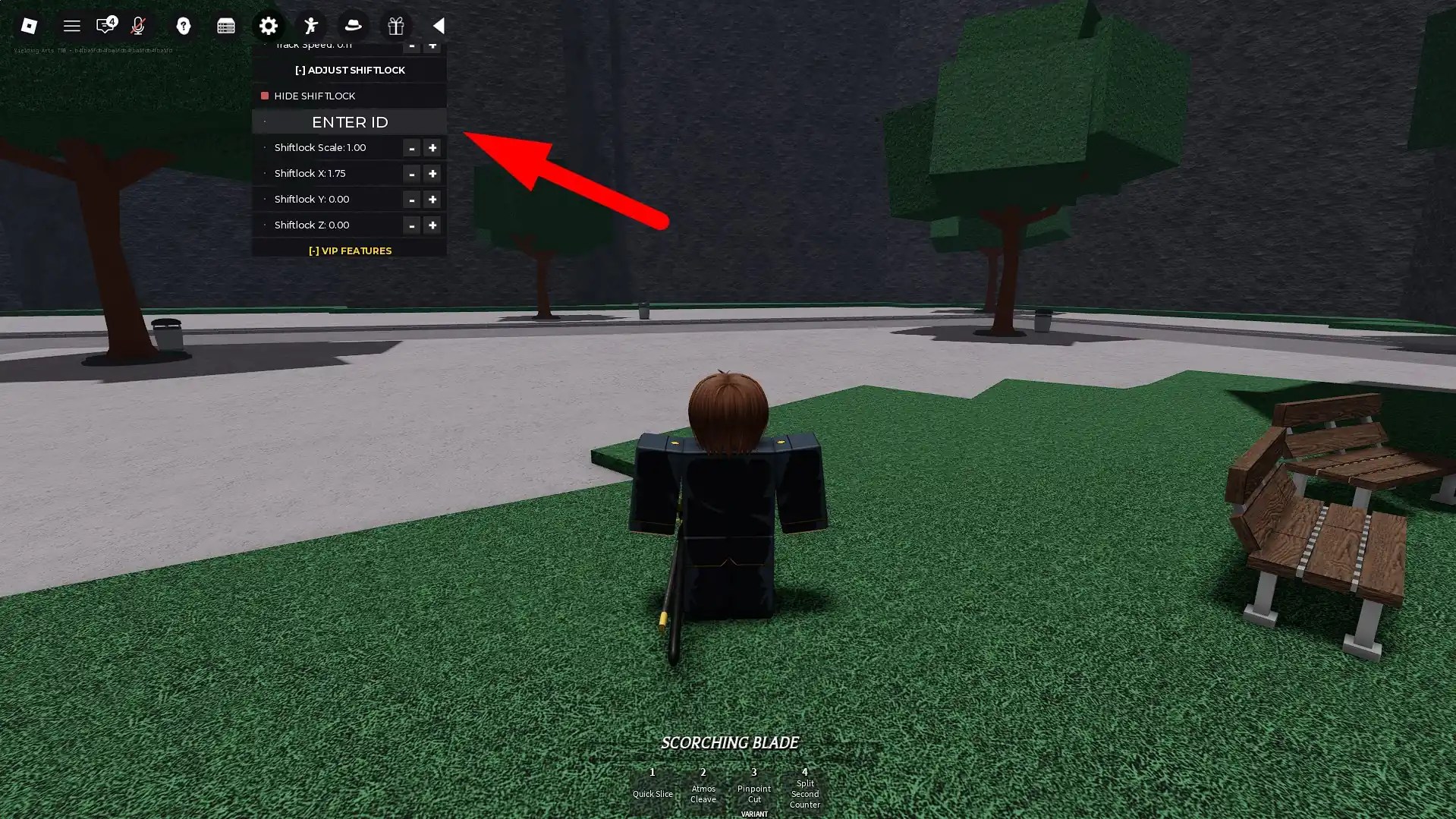
Changing the shiftlock decal ID is a free option that can be enabled in the settings menu. To find the shiftlock menu, go to Settings (cogwheel icon) → Configuration → Adjust Shiftlock. In that menu, you can input a custom shiftlock ID, change the crosshair size, and offset the crosshair’s position.
What Does Changing the Shift Lock ID Do?
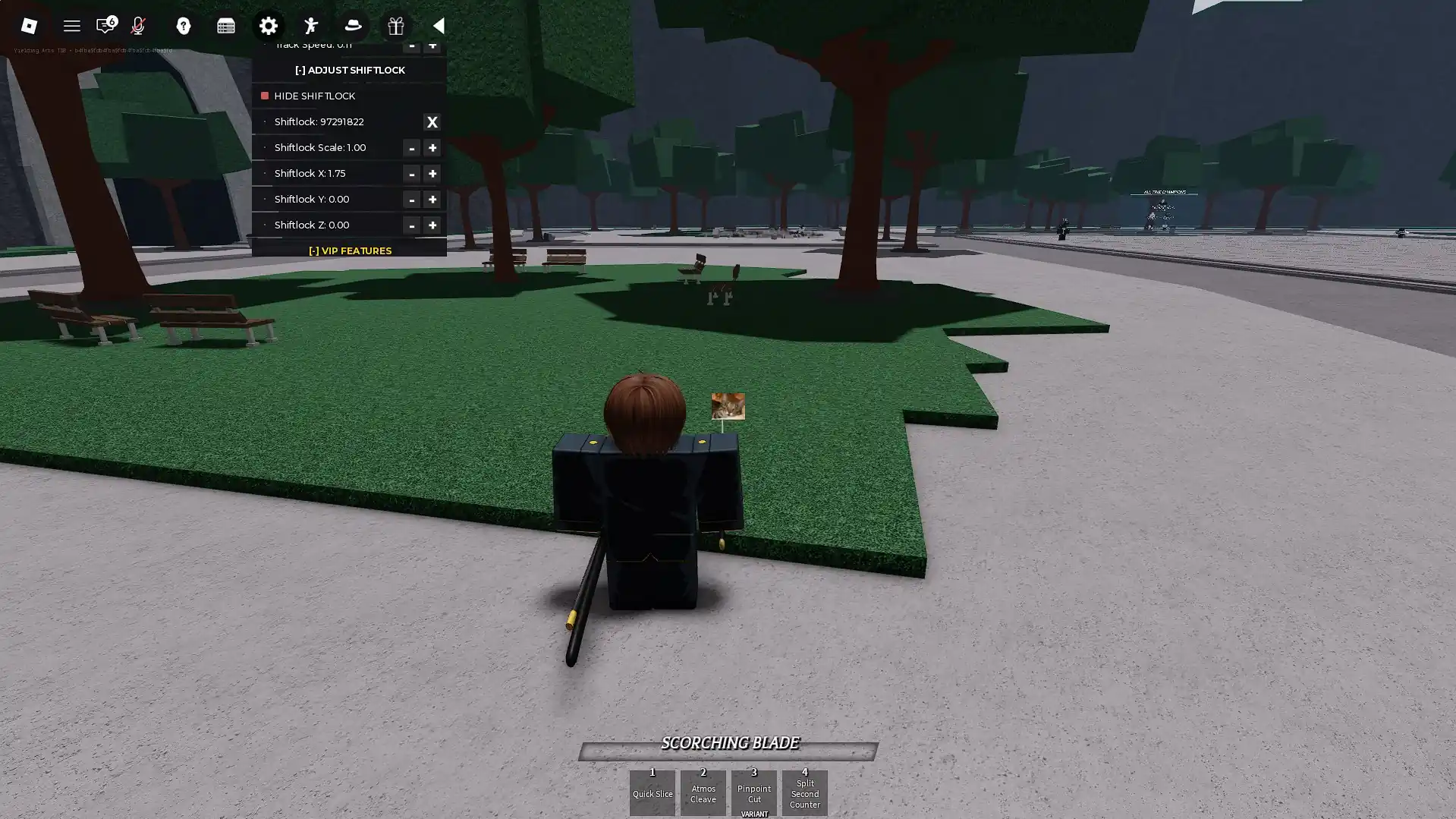
Changing the shiftlock ID replaces your default shiftlock crosshair with a custom one. The images used instead of the default crosshair can be partially transparent, though that depends on the way the decal was uploaded to the Roblox Asset Store.
Where to Find Shift Lock IDs (Image IDs)
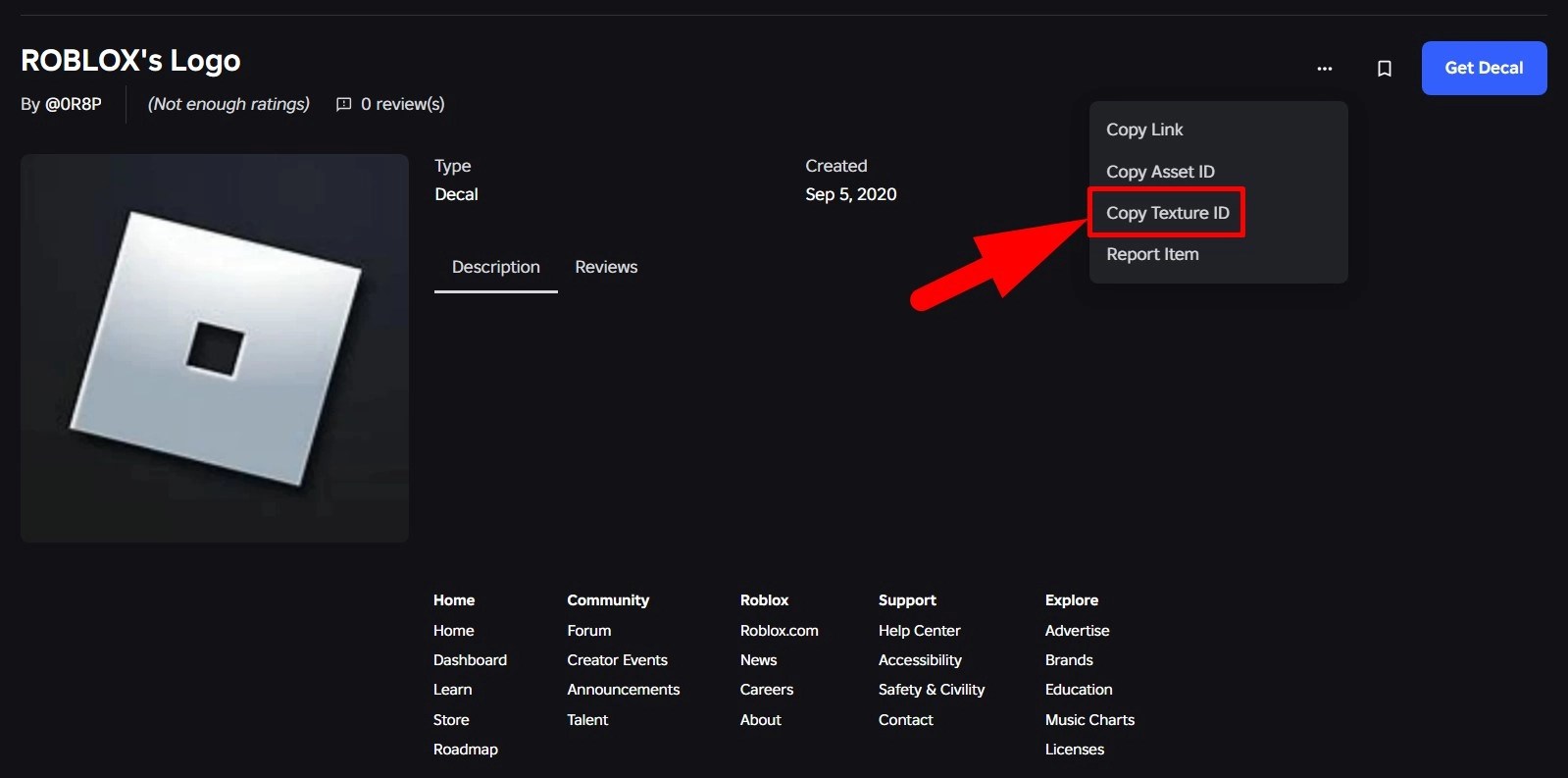
As we mentioned before, the assets you can use instead of the default shiftlock crosshair are all images available on the Roblox Asset Store. Note that decals are not the same as images when browsing the store. To copy an image’s ID, do the following:
- Go to the Roblox Asset Store.
- Open a decal asset.
- Click on the three dots in the top right.
- Click on Copy Texture ID.
- NOTE: Asset IDs aren’t the same as Texture IDs and won’t work if you try to use them in The Strongest Battlegrounds.
- Paste the ID into the in-game menu.
The Strongest Battlegrounds Shiftlock IDs FAQ
To make a custom crosshair, you need to publish an asset on the Roblox Asset Store. It’s a lengthy process, but you can do it.
The ID isn’t working. What do I do?
If the ID isn’t working, make sure that you copied the Texture ID and not the Asset ID. Also, double-check the ID in case you are typing it out.
How do I change the ID back to the default one?
Click on the X button next to the Change Shiftlock text field to revert it to the default crosshair.
That covers all you need to know regarding the best shiftlock codes for The Strongest Battlegrounds Roblox experience and how to use them. For more helpful guides, including our Be The Final Boss tier list, visit the Roblox section here at Gamepur!




Published: Jul 29, 2026 10:36 am